
OpenClaw on $12: AI Agents on Microcomputers
Someone asked me: “What mini‑devices can run OpenClaw these days? I heard a Chinese company runs it on something ‘nano’, with a screen.”
I dug around. Turns out the question isn’t about OpenClaw, but about its younger sibling — PicoClaw. And that changes everything.
OpenClaw on Raspberry Pi — the conventional path
The classic choice: Raspberry Pi 5 (8 GB). OpenClaw runs fully on it — with memory, skills, Telegram bots, cron tasks. Requires Node.js 18+ and about a gigabyte of RAM under load. Price: $100+.
There are official guides from Adafruit, Raspberry Pi Foundation. This is the route for those who want all of OpenClaw’s features in a compact case.
But if you don’t need a full‑blown agent, just a lightweight helper for a single task — there’s a cheaper option. By an order of magnitude.
Chinese revolution: Sipeed and PicoClaw
The Chinese company Sipeed rewrote OpenClaw in Go, cut memory usage tenfold and named the project PicoClaw.
- Memory: 10 MB vs 100 MB+ for OpenClaw
- Startup: <1 second vs 30 seconds
- Architectures: x86_64, ARM64, RISC‑V
- Hardware cost: from $10 vs from $100

PicoClaw — ultra‑lightweight AI assistant by Sipeed.
Same features: Telegram bot, Discord, QQ, DingTalk, cron reminders, long‑term memory, skill system. Just lighter.
LicheeRV Nano — the $12 board
Sipeed LicheeRV Nano — a single‑board computer the size of an SD card (22×36 mm). Specs:
- CPU: SOPHGO SG2002, RISC‑V, 1 GHz
- Memory: 256 MB DDR3
- Network: Wi‑Fi 6 + Ethernet (“W” version)
- Price: $12–20 on AliExpress
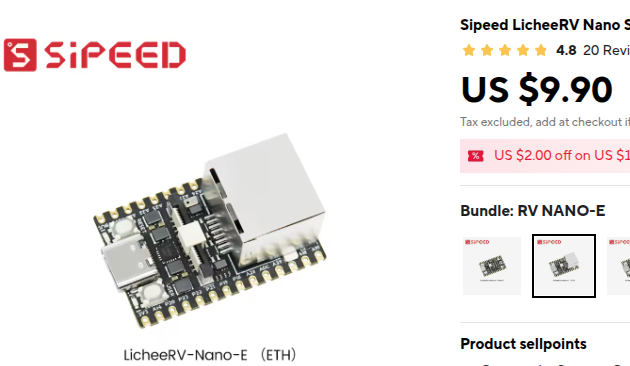
Sipeed LicheeRV Nano — $12 RISC‑V board that runs PicoClaw.
Flash Debian, then one command — PicoClaw. You get an AI assistant that:
- Replies on Telegram
- Sends morning reminders
- Watches your calendar
- Runs 24/7, sipping watts
For comparison: a Mac mini, often used for OpenClaw, starts at $600. Here — $12.
NanoKVM‑Pro — the device with a screen
That “nano with a screen”. Sipeed NanoKVM‑Pro — an IP‑KVM for remote server management, with an unexpected twist:
- 4K HDMI capture
- Built‑in mini display
- ATX power control
- 1 GB RAM, 32 GB eMMC
- Price: $89–109
PicoClaw runs on it, too. The result: a standalone AI terminal — screen shows status, buttons for control, inside — an agent monitoring servers and sending alerts.
OpenClaw vs PicoClaw: capability differences
Though both are called “Claw”, they solve different problems. Here’s what one can do and the other can’t:
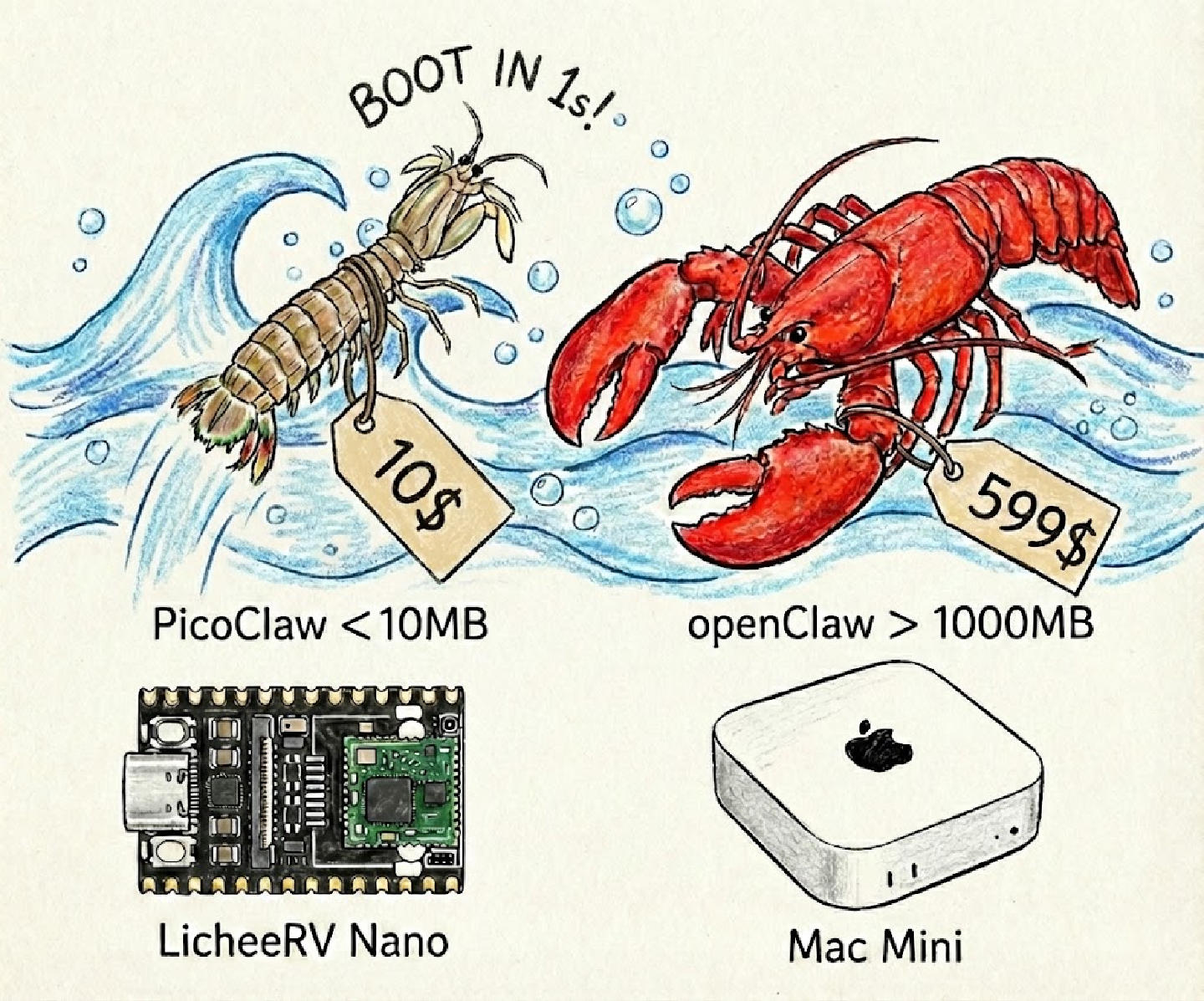
Official comparison: OpenClaw (TypeScript, 1 GB RAM) vs PicoClaw (Go, 10 MB RAM).
| Capability | OpenClaw | PicoClaw | What it means |
|---|---|---|---|
| Language / Architecture | TypeScript / Node.js | Go (single binary) | PicoClaw needs no runtime, runs anywhere |
| Memory footprint | ~1 GB idle | <10 MB | PicoClaw is 100× lighter |
| Startup time | 30–500 seconds | <1 second | PicoClaw starts instantly |
| Messaging platforms | 15+ (WhatsApp, iMessage, Teams, Matrix, Slack, Telegram…) | Telegram, Discord, QQ, DingTalk, LINE, WeCom, Slack | OpenClaw — Western platforms, PicoClaw — Asian |
| Browser automation | ✅ Full Chrome access (CDP) | ❌ None | OpenClaw can click websites, PicoClaw cannot |
| Shell access | ✅ Full command access | ⚠️ Limited | OpenClaw can install software, PicoClaw — only basic commands |
| Voice (ElevenLabs) | ✅ Full support | ⚠️ Via Groq Whisper (in development) | OpenClaw can speak, PicoClaw not yet |
| Hardware I/O (I2C/SPI) | ❌ None | ✅ Yes (since v0.2.0) | PicoClaw reads temperature, motion, humidity sensors |
| Offline mode | ❌ Requires API keys | ✅ PicoLM (1B parameters) | PicoClaw works without internet, OpenClaw does not |
| Skills marketplace | ClawHub (5000+ skills) | Skill validation system (growing) | OpenClaw — huge ecosystem, PicoClaw — young |
| Multi‑agent routing | ✅ Full support | ✅ Sub‑agent spawning | Both can work with multiple agents |
| Target hardware | Servers, VPS, desktops (1.5 GB+ RAM) | RISC‑V, ARM64, x86 (32 MB+ RAM) | OpenClaw — for powerful machines, PicoClaw — for embedded |
When to choose OpenClaw?
- You need a full personal assistant with browser, shell, voice access
- You’re on a server / VPS / Mac mini with 1.5 GB+ RAM
- You need integration with WhatsApp, iMessage, Teams
- You want skills from ClawHub (5000+)
When to choose PicoClaw?
- You’re running an AI agent on a $10–20 single‑board computer
- You need offline operation (no internet)
- You work with sensors via I2C/SPI (IoT, robotics)
- Your audience is in Asia (QQ, DingTalk, LINE, WeCom)
- Resources are limited (32–64 MB RAM)
Where to buy?
- LicheeRV Nano: AliExpress US, Amazon US
- NanoKVM‑Pro: search “Sipeed NanoKVM Pro” on AliExpress ($89–109)
- PicoClaw: GitHub, official site
What does this change?
Before, an AI agent required a Mac mini or a $10/month VPS. Now — a one‑time $12 payment, and you have a physical device that:
- Doesn’t depend on a cloud provider
- Sips power like a USB lamp
- Sits silently in a corner, doing routine work
- Fits in your pocket, can be carried anywhere
PicoClaw on LicheeRV Nano is the democratization of AI assistants. Not for every task, but for many.
The Chinese word “nano” turned out not to be marketing, but a statement: AI agents now fit on an SD card and cost as much as a cup of coffee.
I wonder what will happen in a year, when such boards appear in every DIY store.